![[LogoShip]](logo5.png)
Software for Windows
Science with your Sound Card!


Features:
Oscilloscope
Spectrum Analyzer
8-Channel
Signal Generator
(Absolutely FREE!)
Spectrogram
Pitch Tracker
Pitch-to-MIDI
DaqMusiq Generator
(Free Music... Forever!)
Engine Simulator
LCR Meter
Remote Operation
DC Measurements
True RMS Voltmeter
Sound Level Meter
Frequency Counter
Period
Event
Spectral Event
Temperature
Pressure
MHz Frequencies
Data Logger
Waveform Averager
Histogram
Post-Stimulus Time
Histogram (PSTH)
THD Meter
IMD Meter
Precision Phase Meter
Pulse Meter
Macro System
Multi-Trace Arrays
Trigger Controls
Auto-Calibration
Spectral Peak Track
Spectrum Limit Testing
Direct-to-Disk Recording
Accessibility
Data Logger
Waveform Averager
Histogram
Post-Stimulus Time
Histogram (PSTH)
THD Meter
IMD Meter
Precision Phase Meter
Pulse Meter
Macro System
Multi-Trace Arrays
Trigger Controls
Auto-Calibration
Spectral Peak Track
Spectrum Limit Testing
Direct-to-Disk Recording
Accessibility
Applications:
Frequency response
Distortion measurement
Speech and music
Microphone calibration
Loudspeaker test
Auditory phenomena
Musical instrument tuning
Animal sound
Evoked potentials
Rotating machinery
Automotive
Product test
Contact us about
your application!
Sound Card Calibration (.CAL and .FRD) Files
- Introduction
- Calibration (.CAL) Files
- Frequency Response Data (.FRD) Files
- Dayton Audio iMM-6 Calibrated Measurement Microphone
- Viewing Calibration Curves
Introduction:
Calibration files are used to correct measured spectrum values to compensate for irregularities in the frequency response of transducers like microphones and speakers. The calibration file is essentially the frequency response of the transducer, which Daqarta subtracts from the raw response of a signal that was measured with that transducer.
For example, if a microphone as a peak of 3 dB at 2 kHz, that means that measurements of a 2 kHz signal will appear to be 3 dB too loud without calibration. With the file, the 3 dB is subtracted so the measurements are as if the microphone had a perfectly flat frequency response.
Likewise, if a speaker has a 3 dB peak at 2 kHz, that means that a test signal it creates will actually be 3 dB louder at 2 kHz than expected. A response measured with a perfect microphone will show that peak, whereas if the speaker calibration is applied to the microphone signal it will show what the response would have been with a perfect speaker.
Alternatively, you can apply the speaker calibration to the signal being generated such that the display of the output signal will reflect the actual sound output, peak and all. This can be especially useful when creating noise bands with certain shapes. See Load Mic (or Spkr) Cal File.
Daqarta supports its own .CAL format, as well as the emerging industry-standard .FRD format. Calibration files of either type should be placed in the Documents - Daqarta - App_Data folder.
Calibration (.CAL) Files:
A Daqarta .CAL file is a plain ASCII text file which can be created with Windows Notepad. It contains entries for the unit name and reference sensitivity, followed by a list of frequencies and dB difference from reference at each frequency. Entries must be in ascending frequency order, and should include an entry for 0 Hz as well as the maximum frequency you expect to use.
Daqarta uses linear interpolation to convert file entries to the dB correction for each spectral line at the active sample rate. If you don't include zero and maximum frequency entries, Daqarta will use simple extrapolation. That probably won't be as good as your estimate.
Comments may appear in the .CAL file on separate lines that start with a semicolon (;), or following a semicolon at the end of a data line. Blank lines are ignored.
After any initial comment lines, the first active line should start with 'Unit:' followed by the unit name, as in:
Unit:SPL
The name may be up to 4 characters long. Leading spaces are considered part of the name, so 'SPL' and ' SPL' are two different names. Trailing spaces are ignored. Case is preserved. In general, this name will appear in the Units Name control on the User Line dialog, and will be shown at the top of the Y axis and as a column head in .TXT output files.
However, two names are given special treatment: 'SPL' and 'Pa'. 'Pa' is the abbreviation for Pascal, which is a unit of pressure that is equivalent to 93.9794 dB SPL (Sound Pressure Level). If you use either of these names, Daqarta will convert between them as required. In waveform or linear Spectrum mode, the 'Pa' unit will be used, whereas 'SPL' will be used for the Y-log power spectrum as long as the Spectrum RMS button is active. (RMS is mandatory for SPL measurements.)
The next active line in the .CAL file is the 'Sens:' line, which gives the full-scale reference (0 dB) level for the response data to follow. Data sheet response curves for microphones typically give output versus frequency, relative to some baseline value which is labeled as 0 dB on the curve. The actual absolute value corresponding to 0 dB is given separately, and is typically called the "sensitivity".
There are numerous ways sensitivity may be given on data sheets, but the .CAL file expects this to be relative to 1 volt RMS. For a microphone whose 'Unit:' entry was 'SPL', this would be the SPL required to produce a 1 VRMS output from the mic. For an output device, it would be the SPL produced by the device for a 1 VRMS drive level.
In the more general case, the Sens value would be in dB relative to 1 V/Unit, where Unit could be Pa or any unit of your choice.
As an example, the manufacturer's specifications for a 1/2-inch condenser microphone may state that it has a sensitivity of 12.5 mV/Pa, equivalent to -38 dB relative to 1 Volt/Pa. (20 * log10(0.0125) = -38.06 dB)
The .CAL file could thus use:
Unit:Pa
Sens:38.06
That means that to produce 1 VRMS from the mic, we need an RMS pressure that is 38.06 dB above 1 Pa, which is 10^(38.06 / 20) or 79.98 Pa.
Caution: Note that the manufacturer stated sensitivity as the voltage output for a 1 Pa sound pressure. Since that is only 12.5 mV, the equivalent dB value is negative. But the CAL file Sens line is the number of Pa to produce 1 Volt, which is the same numerical value only positive.
Alternatively, the .CAL file could use:
Unit:SPL
Sens:132
Here the Sens value is found by noting that since it takes a sound that is 38.06 dB louder than 1 Pa to produce 1 Volt, and that 1 Pa is equivalent to 93.9794 dB SPL, then the dB SPL to produce 1 Volt is the sum of these or 132.04 dB SPL.
A typical .CAL file:
;B&K 4134 microphone calibration.
Unit:SPL
Sens:132

;Freq       dB
0          -60
5          -4.1
15         0
8000       0
15000      1.0
20000      0
50000      -12.5
Loudspeaker data sheets typically give the sensitivity as dB SPL at 1 meter on-axis for a 1 watt driving signal (often abbreviated as 'dB/W/m', which is a bit misleading). To convert to 1 VRMS you could use the relationship that
watts = volts^2 / ohms
and rearrange it to
volts = sqrt(watts * ohms).
But since watts = 1 here,
volts = sqrt(ohms).
Now you need to know the speaker impedance, which is typically 4 or 8 ohms "nominal". For an 8 ohm speaker, the square root would give 2.83 volts RMS, which is 9.04 dB above 1 VRMS. (See the dB section for computation details.) You would thus have to reduce all the manufacturer's dB values by this amount to convert to a 1 VRMS reference.
However, it is strongly recommended that you not rely on speaker manufacturer's curves as anything other than comparative reference data for purchase decisions. If you need to know the actual response from a particular speaker in your particular setup, you really need to calibrate it yourself.
Note that .CAL files are not restricted to microphones and speakers, nor even to conventional transducers. It is perfectly possible to have a .CAL file for an electrical filter network, in which case the Unit Name might be Volt. Of course, you could have .CAL files for current-to-voltage transducers or anything else you have in mind. All that is needed is a conversion between your units and volts, which is the native signal for the sound card.
Also, note that Curve files (with a .CRV extension) use the same format as .CAL files, except the 'Unit:' and 'Sens:' lines are ignored. Curve files may be more appropriate for some applications.
Frequency Response Data (.FRD) Files:
The .FRD file format is an emerging industry standard for calibrated microphones. It is similar to .CAL except that instead of just frequency and dB columns, there is a third column for phase. Comment lines are allowed only in the header before the actual data, and must start with an asterisk (*) instead of a semicolon.
The typical .FRD file supplied with most calibrated microphones also lacks the Unit and Sens lines required by Daqarta for absolute (SPL) display or use of the Sound Level Meter option. However, such an .FRD file can be used with Spectrum Curves just as it is if you only need a relative calibration, where you just want to see the shape of the frequency response without measuring absolute levels.
You can manually add the Unit and Sens lines with Windows Notepad or any text editor, and re-save the result. To keep the file compatible with other applications that use the .FRD format, use asterisks to make the Unit and Sens lines look like comments:
*Unit:SPL
*Sens:134.5
Daqarta will look past the asterisks to read the Unit and Sens values, while other applications will treat these lines as comments and ignore them.
Daqarta will ignore the phase data column.
If you perform your own microphone or other calibrations, you can save them as .FRD files with the Save Y-log Trace as .CAL, .FRD, .CRV, or .LIM File option in the File Menu. These .FRD files will have the Unit and Sens values included with asterisks, as above. The phase data will be all zeros.
Dayton Audio iMM-6 Calibrated Measurement Microphone:
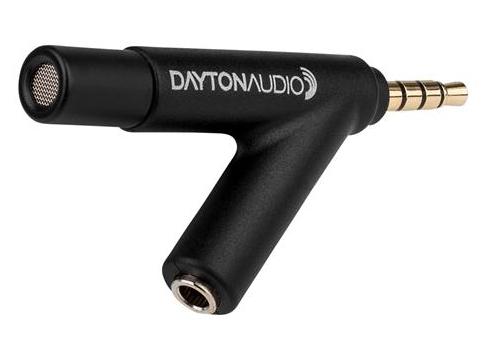
This inexpensive calibrated microphone (under $20 US) is unusual in that it doesn't require a separate "phantom" power supply. Each unit is individually calibrated from 20 Hz to 20 kHz. The manufacturer's specifications are:
    Capsule type: Precision 6mm electret condenser
    Polar Response: True Omnidirectional
    Frequency Response: 18 Hz - 20 kHz (Calibrated)
    Impedance: 200 ohms
    Sensitivity at 1 kHz into 1K ohm: 10mV/Pa (-0dBV, re. 0dB = 1V/Pa)
    Max SPL for 1% THD @1000 Hz: 127 sB
    S/N Ratio: 70 dB A weighted (varies depending on host device)
    Connector: gold-plated 3.5mm TRRS
    Weight: Ultra-light 7.6 grams
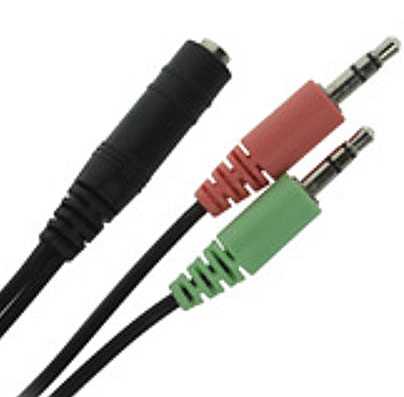
The iMM-6 is intended for Android and Apple devices with TRRS (Tip, Ring, Ring, Sleeve) jacks that connect to headphones and a microphone with a single plug. Daqarta doesn't run on Android or Apple devices, but it can use this microphone on any Windows system by means of a simple adaptor. It's called a "Headset and Microphone Adapter 3.5mm TRRS Female to 2 x 3.5mm TRS Stereo Male":
When your iMM-6 arrives, follow the instructions that come with it to download the unit's individual calibration curve from Dayton Audio, using the serial number on the back of the foam-lined metal case.
The file name is the serial number with a .TXT extension. This is a plain ASCII text file that you can open with Windows Notepad or similar plain text editor. (Don't use a word processor unless you are confident that you can save it as plain text after modifying it.)
The start of the file will be similar to this:
*1000Hz -39.2

20.00   -4.1
20.55   -3.9
21.11   -3.8
21.69   -3.6
 . . .
Note the value after 1000Hz on the first line, which is -39.2 in this case. Edit the file by adding *Unit:Pa and *Sens:39.2 lines, where the Sens value is the same number as on the first line but without the minus sign:
*1000Hz -39.2

*Unit:Pa
*Sens:39.2

20.00   -4.1
20.55   -3.9
21.11   -3.8
21.69   -3.6
 . . .
Now save the file using the name of your choice, but with an .FRD extension, such as iMM6.FRD. Copy that file to the Documents - Daqarta - App_Data folder and you're done.
That first number (-39.2) is the sensitivity of the unit relative to 1V/Pa, which is equivalent to 10^(-39.2 / 20) or 0.01096 V/Pa or 10.96 mV/Pa. (See Calibration (.CAL) Files, above.) That means this particular unit is slightly more sensitive than the advertised nominal value of 10 mV/Pa at 1 kHz.
Viewing Calibration Curves:
In normal use, you only see the effects of a calibration curve when applied to some spectrum whose response you want to correct. If you want to see the shape of the curve alone, without any underlying signal, you can apply it to a spectrum that is perfectly flat. The best way to get that is with an impulse signal, as described in the Impulse Response topic under Frequency Response Measurement.
load the Impulse45.GEN setup, which creates a positive pulse only one sample wide, at a frequency of 45 Hz that is low enough that only one pulse appears in an unexpanded waveform view. This makes an annoying buzz, so you should mute the output... that won't affect the viewing, since in this case everything is internal.
While in waveform mode (Spectrum off), open the Trigger control dialog. Make sure Trigger is active and set to Normal mode, with Source set to Left Out, Slope set to Positive, Level set to 50% (not critical), and Delay set to -20 samples (also not critical). You should see a single spike near the start of the trace.
Now go to the Spectrum control dialog and set the Window button off. With Spectrum on you will see a perfectly flat line except at 0 Hz. Click on the Spectrum Curves button to open that dialog. Click the wide Weighting Curve0 File button, and open the desired calibration file. (The dialog defaults to showing .CAL files, so you might have to change "Files of type" to .FRD first.)
Now click the Left Out button just below the file button, and the display will show the calibration curve. You can use the cursor readouts to measure the relative dB difference between various points on the curve.
See also Load Mic Cal File, Formulas For Working With Sound

- Back to Sound Card Cables and Connectors
- Ahead to Changing the Desktop Icon
- Daqarta Help Contents
- Daqarta Help Index
- Daqarta Downloads
- Daqarta Home Page
- Purchase Daqarta
Questions? Comments? Contact us!
We respond to ALL inquiries, typically within 24 hrs.INTERSTELLAR RESEARCH:
Over 35 Years of Innovative Instrumentation
© Copyright 2007 - 2023 by Interstellar Research
All rights reserved