![[LogoShip]](logo5.png)
Software for Windows
Science with your Sound Card!


Features:
Oscilloscope
Spectrum Analyzer
8-Channel
Signal Generator
(Absolutely FREE!)
Spectrogram
Pitch Tracker
Pitch-to-MIDI
DaqMusiq Generator
(Free Music... Forever!)
Engine Simulator
LCR Meter
Remote Operation
DC Measurements
True RMS Voltmeter
Sound Level Meter
Frequency Counter
Period
Event
Spectral Event
Temperature
Pressure
MHz Frequencies
Data Logger
Waveform Averager
Histogram
Post-Stimulus Time
Histogram (PSTH)
THD Meter
IMD Meter
Precision Phase Meter
Pulse Meter
Macro System
Multi-Trace Arrays
Trigger Controls
Auto-Calibration
Spectral Peak Track
Spectrum Limit Testing
Direct-to-Disk Recording
Accessibility
Data Logger
Waveform Averager
Histogram
Post-Stimulus Time
Histogram (PSTH)
THD Meter
IMD Meter
Precision Phase Meter
Pulse Meter
Macro System
Multi-Trace Arrays
Trigger Controls
Auto-Calibration
Spectral Peak Track
Spectrum Limit Testing
Direct-to-Disk Recording
Accessibility
Applications:
Frequency response
Distortion measurement
Speech and music
Microphone calibration
Loudspeaker test
Auditory phenomena
Musical instrument tuning
Animal sound
Evoked potentials
Rotating machinery
Automotive
Product test
Contact us about
your application!
Stream DC Offset
Macro: Offset, OffsetMode
- Introduction
- Offset Mode
- All
- Burst
- Base
- Fade Interaction
Introduction:
Offset here means 'level shift', not the opposite of 'onset'.
In the default 'All' mode, the DC Offset control adds or subtracts a constant value from the stream wave, effectively sliding it up or down within its range. The total of DC Offset and Level must ordinarily not exceed 100%, assuming a normal waveform that uses all of its range. If you add or subtract too much, the wave slides up or down so far that it is "clipped" to the maximum or minimum value. This produces distortion, which gets worse as more of the wave is clipped off.
Note that sound cards block constant (DC) values from ever reaching the output, so unless clipping is present there will be no audible effect. So, why bother to have this control at all?
The DC Offset control is useful when the Stream is used as the modulation source for another Stream, allowing you to provide some constant amount of modulation on top of whatever is provided by the simple waveform. DC Offset is also sometimes useful when adding Pulse Streams together.
Offset Mode:
Clicking the offset mode button to the right of the DC Offset control advances from the default 'All' to 'Burst' and then 'Base' before wrapping back to 'All'. The Burst and Base modes only affect how the DC Offset is applied when the stream is generating tone bursts.
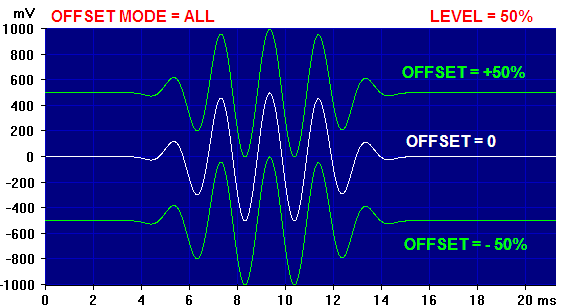
In All mode the DC Offset is applied everywhere. This is true regardless of whether the stream is generating a continuous wave or producing tone bursts. The Offset value effectively becomes the waveform baseline, including the 'off' part of a tone burst.
Here is a composite image showing a burst with Level = 50% at Offset settings of +50%, 0, and -50% in All mode:
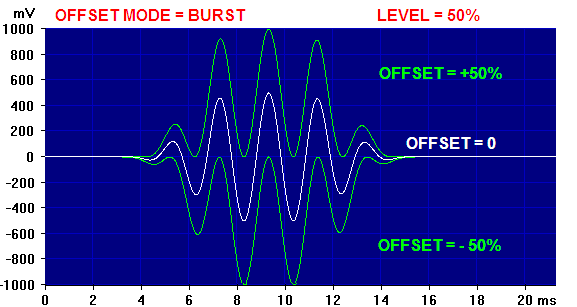
When the offset mode is set to Burst, the DC Offset is only applied to the region included in the burst (Rise, High, and Fall regions); the 'off' or baseline (the initial Lag, and the rest of the Cycle after Fall ends) remains at zero. This mode is especially useful when you are adding Burst Streams together, such as when creating complex waves for Arb files.
The image below shows the same 50% Level burst as before, again with Offset settings of +50%, 0, and -50%, but here in Burst mode:
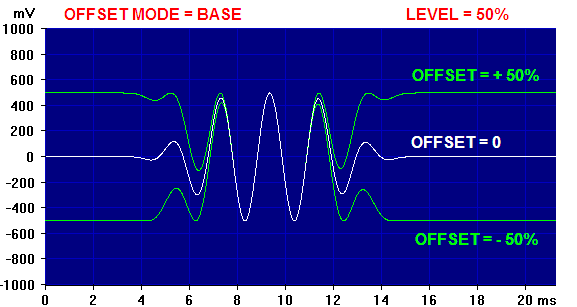
In Base offset mode the Offset value again sets the burst waveform baseline, as in All mode, but here it does not shift the burst portions of the wave. Below is the same 50% Level burst as before, again with Offset settings of +50%, 0, and -50%, but now in Base mode:
One noteworthy difference with Base mode is that Level and Offset can both be 100% without clipping. The image below shows a burst in Base mode at 100% Level, with Offset values of +100%, 0, and -100%:
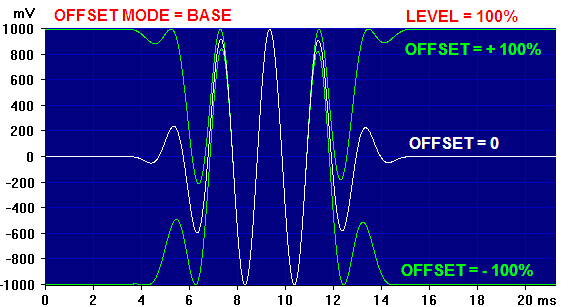
Although the central regions show considerable overlap here, note that the lowest trace with -100% Offset is essentially identical to the upper Burst mode trace with +50% Offset, except that here it has twice the amplitude. This is especially useful with sound cards having the Simple Sound Card Unipolar DC output modifications, allowing for example the highest pulse amplitudes.
You may not need DC Offset often, but remember that it is available... when you need it, it will usually be obvious.
Fade Interaction:
Note that when Generator Fade is active, the overall signal is faded from zero to full on when the Generator is started, and back to zero when it is toggled off. The fade includes any DC offset from whatever source, including those discussed above. This may or may not be what you want.
Macro Notes:
L.3.Offset=50 directly sets Left Stream 3 Offset to 50%. L.3.Offset=-50 sets -50%. Alternatively, L.3.Offset=>1 increments and L.3.Offset=>-1 decrements the current Offset by 1%. Only steps of +/- 1% are allowed with this format.
L.3.OffsetMode=0 sets the Left Stream 3 Offset mode to All, while L.3.OffsetMode=1 sets Burst and L.3.OffsetMode=2 sets Base. It is a good idea to always set a known state with OffsetMode before giving an Offset command.
See also Stream Dialog, Signal Generator Control Dialog.

- Back to Stream Level
- Ahead to Multi-Channel Output Controls
- Daqarta Help Contents
- Daqarta Help Index
- Daqarta Downloads
- Daqarta Home Page
- Purchase Daqarta
Questions? Comments? Contact us!
We respond to ALL inquiries, typically within 24 hrs.INTERSTELLAR RESEARCH:
Over 35 Years of Innovative Instrumentation
© Copyright 2007 - 2023 by Interstellar Research
All rights reserved